hash sum mismatch:
http://hk.archive.ubuntu.com trusty/main Translation-en_HK
http://hk.archive.ubuntu.com trusty/multiverse Translation-en_HK
http://hk.archive.ubuntu.com trusty/restricted Translation-en_HK
http://hk.archive.ubuntu.com trusty/universe Translation-en_HK
 

nano /etc/apt/sources.list 

ctrl+w(search)
ctrl+r(replace)
"hk."
""
A(All)
Ctrl+x
save

apt-get update

apt-get update && apt-get upgrade 
 

cd /System/Library/Frameworks/MediaToolbox.framework/

mv RegionalSystemSoundsThatShareBehaviour.plist RegionalSystemSoundsThatShareBehaviour.plist.bak


Inside activity tag
android:screenOrientation="portrait"
if you want VERTICAL fixed orientation

android:screenOrientation="landscape" if you want HORIZONTAL fixed orientation

encrypt the DB

sqlcipher plaintext.db
sqlite> ATTACH DATABASE 'encrypted.db' AS encrypted KEY 'testkey';
sqlite> SELECT sqlcipher_export('encrypted');
sqlite> DETACH DATABASE encrypted;

========
TEST DB

hexdump -C plaintext.db
hexdump -C encrypted.db

decrypt the DB

$ ./sqlcipher encrypted.db
sqlite> PRAGMA key = 'testkey';
sqlite> ATTACH DATABASE 'plaintext.db' AS plaintext KEY '';  — empty key will disable encryption
sqlite> SELECT sqlcipher_export('plaintext');
sqlite> DETACH DATABASE plaintext;

# clone the repo
git clone https://github.com/sqlcipher/sqlcipher.git
pushd sqlcipher

# check if there are any interesting options
./configure --help

# CFLAGS will turn on encryption, default temp_store to memory,
# (file usage optional), enable full-text search, link to libcrypto
./configure CFLAGS="-DSQLITE_HAS_CODEC -DSQLITE_TEMP_STORE=2 -DSQLITE_ENABLE_FTS3 -lcrypto"

# just to be sure everything is in the initial state
make clean

# use as many CPUs as exist
# (you could also use 'sysctl -n hw.physicalcpu', which would not include 'logical' cores)
time make -j $(sysctl -n hw.ncpu)


sudo make install

which sqlcipher

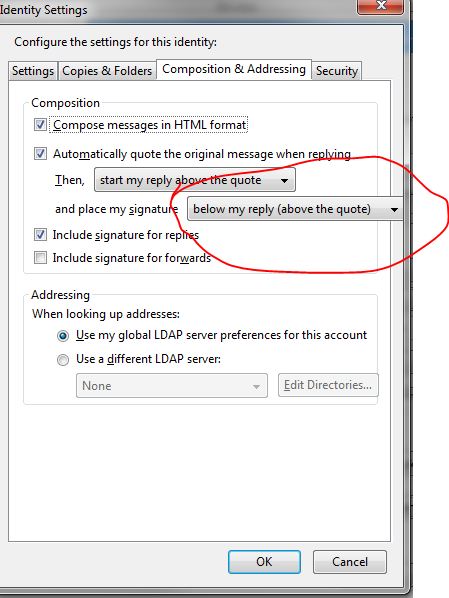
By default signatures in Thunderbird appear at the below quotes. Signatures can be placed immediately below the reply and above the quote by doing this:

  • Tools -> Account Settings -> Select your identity
  • Click the “Manage Identities” button at bottom right
  • Select your identity and click the “edit” button
  • Select the “Composition & Addressing” tab
  • Under “Composition”, check “Automatically quote the original message when replying”, followed by “start my reply above the quote”, and place my signature “above the quote”

sig

nano /etc/cron.d/php5

Change

09,39 *     * * *     root   [ -x /usr/lib/php5/maxlifetime ] && [ -d /var/lib/php5 ] && find /var/lib/php5/ -depth -mindepth 1 -maxdepth 1 -type f -cmin +$(/usr/lib/php5/maxlifetime) ! -execdir fuser -s {} 2>/dev/null ; -delete

to

09,39 *     * * *     root   [ -x /usr/lib/php5/maxlifetime ] && [ -d /var/lib/php5 ] && find /var/lib/php5/ -depth -mindepth 1 -maxdepth 1 -type f -cmin +$(/usr/lib/php5/maxlifetime) -delete


去/etc/httpd.conf uncomment 這句

NameVirtualHost *:80

service httpd restart

« Previous Page | Next Page »

Smiley face

May 2026
S M T W T F S
 12
3456789
10111213141516
17181920212223
24252627282930
31  
晴晴兔的少女回憶 =3=~ All rights reserved.